1377 words [ 49 Screenshots ] [ 13 Versions ] [ 2 Weblinks ] - Last update: 2026-04-22 Page created: 2004-04-03 [SB]
OS/2 Warp
 Main characteristics of OS/2 (Operating System 2) are primarily the simple and powerful user interface WPS (Workplace Shell), stability and technology lead in the earlier years of OS/2. The user interface is built up completely object-oriented.
OS/2 of IBM does not have to be compared with DOS or Windows extensions any more since the version 2.0. This new version corresponded to a new operating system generation, which has the potential to use the full performance of a 32-bit CPU, developed only by IBM. Up to version 1.3 IBM had cooperated in development with Microsoft. The beta version was tested by 30,000 voluntary. It was made under the slogan to create a "Better DOS than DOS" with success. Much programs for DOS and Windows (3.x, Win32s) are executed faster under OS/2 than in the original operating environment.
The project Odin has the destination to execute Win32 programs (Windows 9.x and Windows NT) in OS/2 Warp natively. This happens by conversion of the .EXE and .DLL files into the OS/2 format or about adjustment of the programcode copy in the memory as in the case of OS/2 programs. Said more exactly, the PE (Portable Executable) Win32 binary format get converted into the OS/2 LX binarily (linear eXecutable) format.
A special project is the operating system eComStation developed by Serenty Systems. The last version of the OS/2 operating system was modified, enhanced and taken to the newest technical level, the user interface also was improved.
OS/2 Warp 4 and 4.5
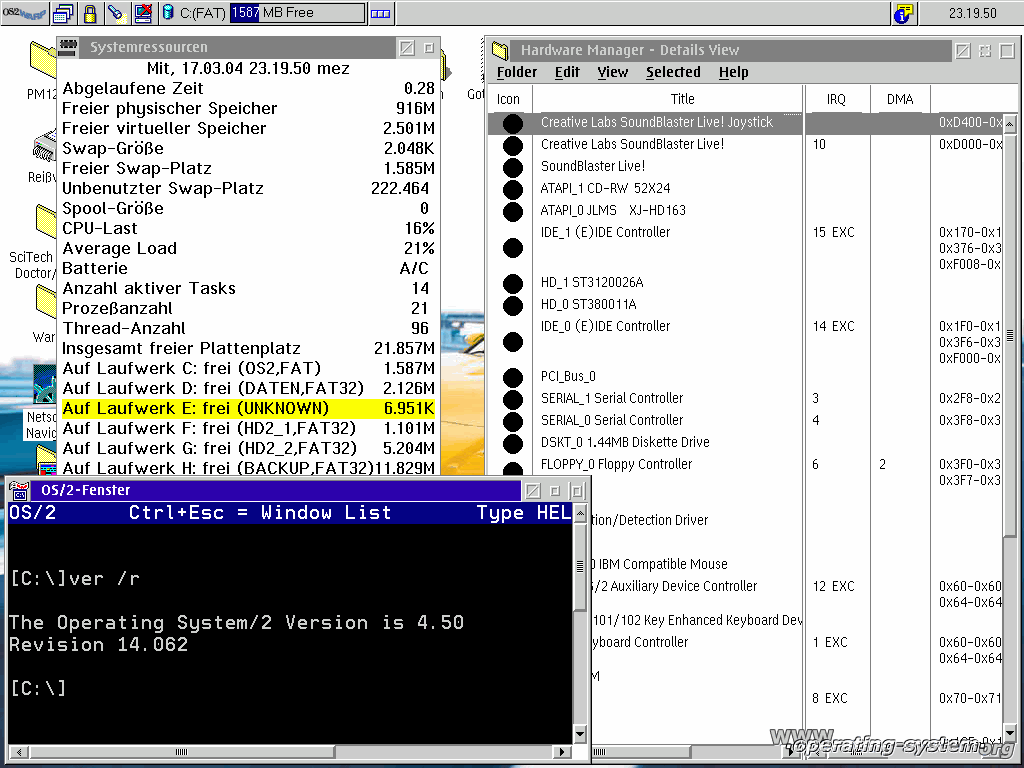 OS/2 Warp 4 was released by IBM in 1996. Because of the long-lasting support by IBM this operating system is holded up to date through service releases and newer hardware drivers to use OS/2 on current computer systems.
Until May 2001 the service release 15 and the Device Driver Pack 2 [0] are free of charge. With this update the system version 4.0 (rev. 9.023) was upgraded to version 4.5 (rev. 14.096 c_W4). After this release IBM grants newer updates only in context of the software subscription with costs. Furthermore free of charge are additions and driver software to support new fixed disk controllers as well as ATAPI devices. Indispensable are the driver software of Daniela Engert [1] which completely replace the IBM standard driver software. With this new drivers large FAT 32 partitions are accessable without problems and the drives operates now in the DMA mode instead of the much slower PIO mode.
The original installation media consists of one boot and two installation floppy disks, one operating system CD-ROM with bonus pack, one application sampler CD-ROM and one driver software CD for older hardware like ISA boards. However, you will need only the boot disk, the operating system CD-ROM and more current installation floppy disks [2] for booting on current PCs.
By the updates you got year 2000 support, new hardware devices, support for large fixed disks up to 502 GByte by the 48-bits of LBA addressing (before at most 4.3 or 8.4 GByte), memory of more than 1 GByte (instead of only 64 MByte), USB devices, faster graphics display and SMP support. FAT 16 partitions are limited to a maximum size of 2.1 GByte, HPFS partitions are recognized up to a size of 64 GByte. It is recommended to upgrade to a newer Kernel like from 11/2003 [3] and the MTRR management [4] supported by Intel P6/AMD K7. With the IFS there can be added the driver to support FAT 32 and ext2fs support. To use sound cards from Creative Labs there exists a ported Open source driver [6], support for current graphics boards comes with the Display Doctor 7.07 in the IBM special edition [7] of SciTech. This is a lite version from the full driver software licensed for IBM to provide it to all OS/2 users for free. If the correct driver software for the available graphics board isn't contained,
only a general driver software is used with only slowest standard functions to provide the highest compatibility for all unknown graphics boards. But if you don`t use OS/2 as platform to play games you will not be able to state any performance deficits. Otherwise the always current full version of SciTech remains indispensable.
The internet access was established with a standard 56K modem with standard AT instructions. The contained Web browser is to old for modern use of the web and should be replaced by an alternative and more current browser. Otherwise many websites are not displayed correct. If the file size does not matter you can download the Mozilla (approx. 14 MByte) or Opera browser (approx. 5 MByte) for OS/2.
To play sound files the PM123 player and MMAudio pack offers its services for media access. The audio format MP3 is supported directly, support for OGG Vorbis and FLAC is also available as Plugin. Video files in the AVI and MPEG format are played best with the Warpmedia player. This also offers DivX support but only for the expired DivX format in version 3.11. Maybe it exists a codec that makes it also possible to view current DivX videos.
With the Odin project there exists a Win32 emulator which makes the use of Windows programs under OS/2 possible through different ways. Comparably with Wine under Linux, only a fraction of all applications for Windows are supported.
| PC Konfiguration | OS/2 Warp release 4.0 (rev. 9.023, original version 1994) | OS/2 Warp release 4.5 (rev. 14.096c_W4, incl. updates up to 2003) |
|---|---|---|
| AMD Athlon XP 2600+ | without extended features | supports MTRR management |
| 1024 MByte RAM | 64 MByte recognized | complete utilizable |
| Seagate 80 GByte and 120 GByte harddisk drive | not utilizable, PIO mode | complete utilizable, DMA mode |
| Geforce 4-TI-4200 Graphiccard | 640x480 with 16 colours | up to 1600x1200 with 16 Mio. colours |
| Soundblaster 512 PCI soundcard | not utilizable | complete utilizable |
| ELSA Microlink 56K Modem | complete utilizable | complete utilizable |
Installation
With the use of the newer setup floppy disks as mentioned large harddisks are utilizably and the desired partition can be selected for the installation. This must be selected as a start partition (C) and marked as installation destination. If you don't take care about this, data loss in the just active partition can be happen. OS/2 Warp 4 is established in this example as the 3rd primary partition with 2.0 GB of size. The booting manager is installed only in this one. As filesystem you should certainly choose HPFS to make long file names possible and avoid installation aborts by to short file names.
[0] Hobbes large OS/2 archive hobbes.nmsu.edu, the service and device Driver pack should be downloaded from here since the installation process was simplified
[1] Daniela Engert: danidasd144.zip (EIDE driver from 11/2001), daniatapi0315.zip (ATAPI driver from 01/2004), danis506r168.zip (chipset driver from 03/2004) can be obtained at Hobbes OS/2 archive; FAT-32 support from fat32.netlabs.org
[2] newer installation floppy disks from 04/2002 at warpdoctor.org
[3] OS/2 Warp Kernel from 11/2003, w41103.zip
[4] P6K7MTRR ver.0.08a from 06/2002, p6k7mtrr_v008a.zip
[5] ext2fs driver from hobbes.nmsu.edu
[6] SoundBlaster Live! OS/2 Audio driver version 0.81, sbliveos2-081b.zip
[7] Graphic driver SciTech SNAP Graphics for OS/2, 01r1064.exe from Hobbes OS/2 archive or as trial version from scitechsoft.com
Serenity Systems licensed OS/2 at the end of 2000 and distribute the operating system under the product name eComStation.
IBM has released in March 2005 the news to guarantee the payed support of OS/2 for registered customers until 12-31-2006 and the ending of the sale of OS/2 products on 12-23-05. After this dates no further support of OS/2 is planned. The number of OS/2 installations was estimated to 500,000 in 2004.
Field of Application
A few small firms, customers
Communications and transaction server in the banks and insurance branch
Other existing important big firms<
Structure information
OS/2, MS-DOS and 16-Bit Windows applications
WPS (Workplace Shell) with a powerful scripting language
Monolithic Kernel
Preemptives multi-tasking
1 to 64 CPU system
32-bit operating system
System environment
Supports HPFS, JFS
Optimized for web applications; reads FAT16 file system with tools for network management
Reads with shareware solutions FAT32, VFAT, NTFS, ext2fs, HFS
Connect different platforms in OS/2 Server Edition
Features
Very stable, protected processes from each other
Interchangeable file systems by Installable File Systems
 |  |  |  |
| OS/2 1.3, Boot screen | OS/2 1.3, Desktop Manager and Task List | OS/2 1.3, Display of the version and Command Interpreter | OS/2 1.3, File Manager |
 |  |  |  |
| OS/2 1.3, Utilities | OS/2 1.3, Shutdown of the operating system | OS/2 1.3, DOS window | OS/2 1.3, Message to turn off the computer |
 |  |  |  |
| OS/2 2.1, Boot screen | OS/2 2.1, Welcome to setup | OS/2 2.1, Note for the upgrade of OS/2 2.0 | OS/2 2.1, Introduction to the installation |
 |  |  |  |
| OS/2 2.1, Drive selection | OS/2 2.1, Formatting the installation partition | OS/2 2.1, Select the file system FAT or HPFS | OS/2 2.1, Transferring files |
 |  |  |  |
| OS/2 2.1, Select features | OS/2 2.1, System configuration | OS/2 2.1, OS/2 setup and installation | OS/2 2.1, Transferring files |
 |  |  |  |
| OS/2 2.1, Advanced options | OS/2 2.1, Configure Win-OS/2 desktop | OS/2 2.1, Operating System/2 Boot screen | OS/2 2.1, OS/2 Tutorial |
 |  |  |  |
| OS/2 2.1, View of the desktop | OS/2 2.1, Win-OS/2 settings | OS/2 2.1, Icons of installed programs | OS/2 2.1, Chess game |
 |  |  |  |
| OS/2 2.1, DOS window, Tree view of drive C: | OS/2 2.1, Message to turn off the computer | OS/2 Logo | OS/2 Warp 3.0, WPS with Kick start bar |
 |  |  |  |
| Warp 3.0, DOS window in OS/2 | Warp 3.0, Work Place Shell (WPS) | Warp 3.0, Desktop settings | Warp 3.0, OS/2 System configuration |
 |  |  |  |
| Warp 3.0, File manager | Warp 3.0, harddisk device options | Warp 3.0, optional possibly to choose HPFS or FAT16 as a file system of a partition | Architecture of OS/2 3.0 |
 |  |  |  |
| OS/2 Warp 4.5 - Software administration | Warp 4.5 - config.sys with activated DMA and FAT32 driver | Warp 4.5 - Displays the system resources, hardware and command line | Warp 4.5 - opened program/directory menu |
 |  |  |  |
| Warp 4.5 - File manager and harddisk drive overview | Warp 4.5 - AudioPlayer plays MP3 files | Warp 4.5 - with Odin, Windows 32 bits of applications can be used under OS/2 (WinRAR, IrfanView) | Warp 4.5 - Connection with the Internet, IBM WebExplorer |  |
| Warp 4.5 - Tutorial program about OS/2 Warp |
Date - Version
1987 - OS/2 1.0 16-Bit1988 - OS/2 1.1 16-Bit, with graphical user interface Presentation Manager (PM)1989 - OS/2 1.2 16-bit for the first time HPFS in, improved Presentation manager1991 - OS/2 1.3 16-bit1992 March - OS/2 2.0 new design, optimized Presentation Manager, protected memory area, up to 240 simultaneous DOS Sessions possible, 32-bit, high compatibility to OS/2 1.x applications, DOS 2.x - 5.x, Windows 2.x - 3.x, "Cut and Paste", new Workplace Shell (WPS), supports LAN Server 2.0, extended Services 2.01994 Jan. - OS/2 2.1 Graphic subsystem optimized, dual DOS-sessions, APM and PCMCIA support1994 Oct. - OS/2 Warp 3.0 networkable, P2P1996 - OS/2 Warp Server Combination of Warp 3.0 aIBM's LAN Server 4.0, server services, remote login1996 Oct. - OS/2 Warp 4.0 (merlin) Integration of the pentium III instructions, improved Plug and Play and multimedia, includes Java and VoiceType technology, universally network client1999 - OS/2 Warp 4.5, bootable cd-rom, new 32-bit TCP/IP stack, JFS2000 - Version 4.51 version which is completely improved and revised of version 4, "Convenience Pak 1"2002 - Version 4.52, "Convenience Pak 2", new functions and bug fixes1999 - Warp Server 4.5 (Aurora) for e-Business, Netfinity Manager, Java 1.1.6 JDK, new 32-bit kernel, SMP for up to 64 CPUs, JFS (64 bit Journaling File System), optimized TCP/IP protocol