605 words [ 24 Screenshots ] [ 6 Versions ] [ 1 Weblinks ] - Last update: 2023-12-22 Page created: 2004-04-03 [SB]
Windows NT 4.0 Workstation
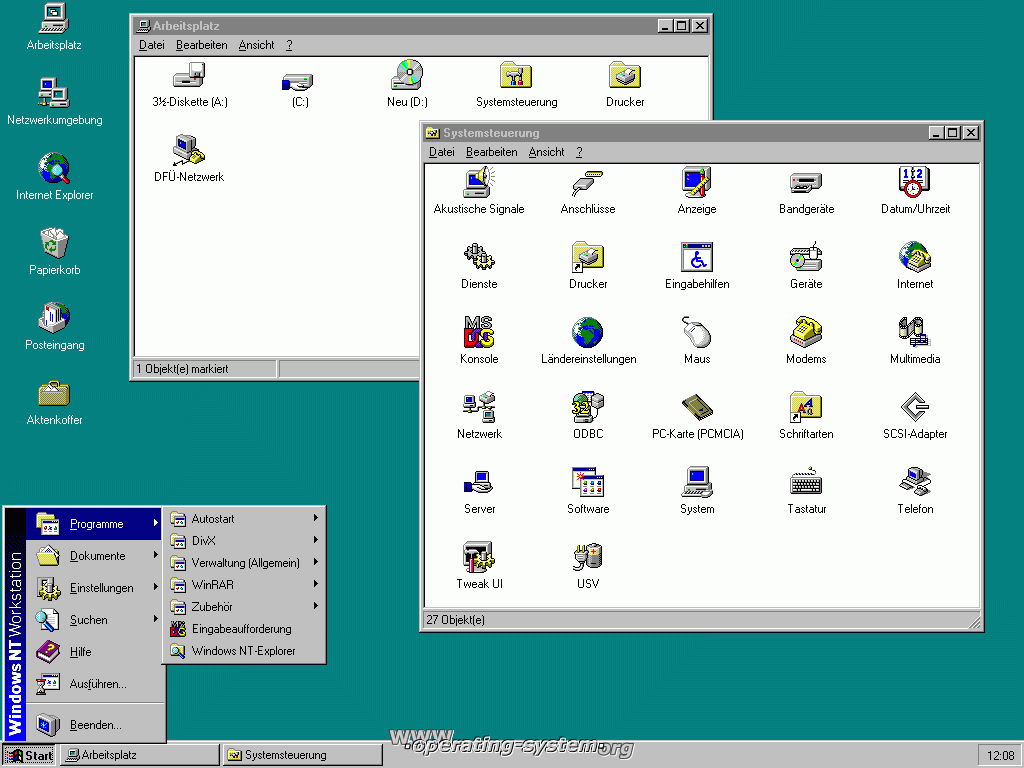 The operating system Windows New Technology in the current version 4.0 of July 1996 was developed further considerably to the predecessor NT 3.51. The user interface of Windows 95 was united and revised with the stability and accuracy of Windows NT and integrated into this new version. The complete graphic engine, user, GDI and graphic driver software were transferred by the user mode into the kernel mode. Through this an improvement in the performance has happen opposite the earlier versions. Standards from the UNIX world like TCP/IP protocols and Posix Guidelines are also includet. Windows NT does not allow direct access to the hardware and controls all accesses. Only with special graphics boards and specified driver software approximately the overlay mode is possible for the faster playback of videos.
Windows NT is availably in a Server Edition (up to 4 CPUs) in a Workstation Version (up to 2 CPUs) and Enterprise Server Edition (up to 8 CPUs). There in addition are the Windows NT Server 4.0 Terminal Edition. The Registry is fully responsible for the user settings, system configuration, hardware and software settings and others. Other configuration files plays only a minor roll opposite to previous NT versions and of course Windows 9x. The Registry is therefore far bigger. The files used for the Registry are NTUSER.DAT from the respective user directory, default (standard user profile), system (hardware configuration), software (installed programs), Security (control of the access list) and Sam (user account and passwords), in the directory "C:/Winnt/system32/config/".
Minimum Requirements:
- 486 CPU or RISC-based CPU, such as Alpha, MIPS or PowerPC
- 16 MB RAM
- 110 MB free hard disk space
- VGA or SVGA compatible graphics card
- CD-ROM drive
Update: August, 23. 1997 With the Internet Explorer 4.0 the Active Desktop is offered as an extension for the installation. It is possible with that to act like in a browser in the Windows Explorer and the desktop can display web objects. The start bar is extended by the integration of own tool bars for the quick start. The user interface looks through this more modern like in Windows 98.
Update: August, 07. 1998 Last DirectX release in the version 6.0 for Windows NT. Direct3D and DirectSound are supported only emulated.
Update: November, 19. 1999 With the 35 mbyte great Service Pack 6.0 Windows NT 4.0 is taken to the newest stand. All bug fixes were integrated in relation with the turn of the year 2000, euro currency support and security updates. The NTFS driver software was revised and supports now except for EFS and Quotas, NTFS 5.0 harddisk storages from Windows 2000. There are no updates for the MDAC and Internet Explorer includet.
Update: July, 26. 2001 The 14.5 mbyte great and last Security Rollup Package (SRP) is published. All Patches are contained that was released since the Service Pack 6a.
Area of application
- Network Client
- Server
- Office use for office programs
Structure informations
- Microkernel
- Platforms: Intel x86, Alpha, on MIPS and PowerPC only very little common
- multi-processor capable (up to 4 CPUs)
- good port to other platforms by a changed HAL
System environment
- Time-Sharing system
- File systems: NTFS, FAT-16
- Protocols: NetBEUI, TCP/IP, IPX/SPX, DLC, AppleTalk
Features
- stable system
- Systemlog for events
- High performance at Office applications
- High security with current Service Packs
- bad integration of newest hardware
- no Plug and Play
- no ACPI or direct USB support
30th June 2003: Windows NT 4.0 Support has ended
Phone support that may charged on an hourly base and extended, limited hotfix support has ended.
 |  |  |  |
| Windows NT 4.0 - Windows NT setup | Select or prepare a destination partition | Formatting of the partition in NTFS is recommended | Copying process of the system files |
 |  |  |  |
| Base settings of the computer | Setup assistant | 4.0 - Create emergency floppy disk for Recovery | Define program selection |
 |  |  |  |
| Network Configuration | Playback of Videos | Internet Explorer 2.0 | Startmenu, Workplace and system control |
 |  |  |  |
| Services of the computer | File explorer and task manager | System registration and network configuration | View of web sites in the Internet Explorer |
 |  |  |  |
| Access to shared files in the network | Assignment of file and folder rights | User managers, logging function, harddisk manager and memory allocation | User manager in detail |
 |  |  |  |
| Logging in the detail | System configuration of .ini files (only to the compatibility) | Screen for logon | Windows NT 4.0 Structure |
Date - Version
1996 July - Windows NT 4.0 Workstation, RTM1997 May - Service Pack 31998 Oct. - Service Pack 41999 Nov. - Service Pack 62001 July - Security Rollup Package (SRP)2003 June - Windows NT 4.0 Support terminated